
Enluks Widgets
All widgets / nebessa
Nebessa apartment finder
Two embeddable modals (Quick Actions + List Criteria) that read the public Enluks API and let users filter apartments by size, floor, building, and bedroom count.
Custom elements
<enluks-quick-actions-modal>
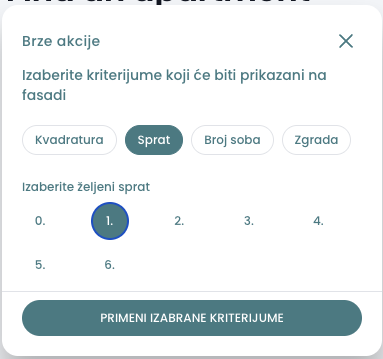
Single-pick criterion overlay. Emits the chosen criterion + value so the host can drive its own building viewer / SVG overlay.
Attributes
| Attribute | Type | Default | Notes |
|---|---|---|---|
open | boolean | false | Show/hide. Host owns toggling. |
locale | 'en' | 'sr' | 'de' | 'ba' | 'sr' | Translations + structure-name labels. |
api-base | string | 'https://server.enluks.io' | Public Enluks API root. |
active-building | string | null | null | Optional. Pre-highlights one entry in the Building tab. |
default-criterion | 'apartment-size' | 'floor' | 'rooms' | 'building' | null | 'apartment-size' | Criterion pill pre-selected when the modal opens. Pass null for none. |
Events
| Event | Detail | Notes |
|---|---|---|
close | void | User clicked X. |
apply-criteria | { areaUnit: 'm2'|'Floor'|'Structure'|'Building', range: string } | Building selections fire immediately and close the modal; other criteria wait for the Apply button. |
<enluks-list-criteria-modal>
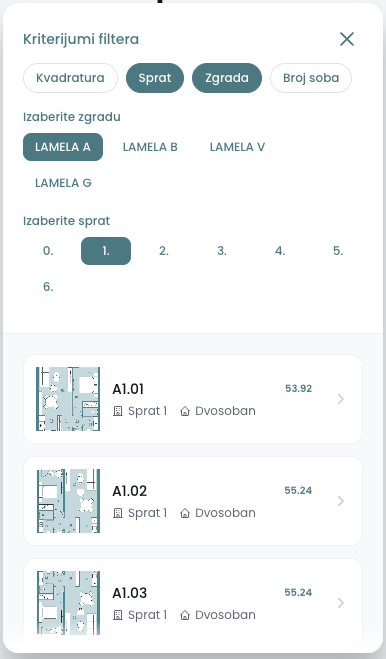
Multi-criterion filter that renders the matching apartment list. Filtering runs client-side over the pre-fetched dataset, so toggling criteria is instant.
Attributes
| Attribute | Type | Default | Notes |
|---|---|---|---|
open | boolean | false | Show/hide. |
locale | 'en' | 'sr' | 'de' | 'ba' | 'sr' | Translations + structure-name labels. |
api-base | string | 'https://server.enluks.io' | Public Enluks API root. |
default-criteria | Array<'apartment-size' | 'floor' | 'building' | 'rooms'> | [] | Criteria pills pre-selected when the modal opens. Set as a DOM property — array values can't pass through HTML attributes. |
default-building | string | null | null | Building API title (e.g. "100000") to pre-select inside the building criterion. Resolved to the locale's lamela name once the project payload arrives. |
Events
| Event | Detail | Notes |
|---|---|---|
close | void | User clicked X. |
navigate-apartment | { apartment: Apartment, buildingTitle: string | null } | Host routes to apartment detail page. |
Examples
<enluks-quick-actions-modal>
<script type="module" src="https://widgets.enluks.io/nebessa.js"></script>

<button id="toggle">Quick filters</button>
<enluks-quick-actions-modal id="qa" locale="sr"></enluks-quick-actions-modal>

<script>
  const qa = document.getElementById('qa');
  document.getElementById('toggle').onclick = () => { qa.open = true; };
  qa.addEventListener('close', () => { qa.open = false; });

  // User picked a criterion. Building selections fire immediately and
  // close the modal; other criteria wait for the Apply button.
  qa.addEventListener('apply-criteria', (e) => {
    const { areaUnit, range } = e.detail;
    // Plug into your own building-viewer / SVG overlay here.
    console.log('Highlight:', areaUnit, range);
  });
</script>
import { useState } from 'react';
import 'https://widgets.enluks.io/nebessa.js'; // or load via <script> tag
export function QuickFilters({ onPick }: { onPick: (areaUnit: string, range: string) => void }) {
const [open, setOpen] = useState(false);
return (
<>
<button onClick={() => setOpen(true)}>Quick filters</button>
<enluks-quick-actions-modal
open={open}
locale="sr"
onClose={() => setOpen(false)}
onApplyCriteria={(e: CustomEvent) => {
const { areaUnit, range } = e.detail;
onPick(areaUnit, range);
}}
/>
</>
);
}<script setup lang="ts">
import { ref } from 'vue';
const open = ref(false);
function onApply(e: CustomEvent) {
const { areaUnit, range } = e.detail;
// forward to your building-viewer / SVG overlay
console.log('Highlight:', areaUnit, range);
}
</script>
<template>
<button @click="open = true">Quick filters</button>
<enluks-quick-actions-modal
:open.prop="open"
locale="sr"
@close="open = false"
@apply-criteria="onApply"
/>
</template>
<!--
Vue needs to know enluks-* tags are custom elements. In nuxt.config.ts
or vite.config.ts add:
vue({ template: { compilerOptions: { isCustomElement: t => t.startsWith('enluks-') } } })
Note the .prop modifier on :open — Vue defaults to setting an HTML
attribute, but custom elements need the boolean as a DOM property.
--><enluks-list-criteria-modal>
<script type="module" src="https://widgets.enluks.io/nebessa.js"></script>

<button id="toggle">Browse apartments</button>
<enluks-list-criteria-modal id="finder" locale="sr"></enluks-list-criteria-modal>

<script>
  const finder = document.getElementById('finder');
  document.getElementById('toggle').onclick = () => { finder.open = true; };
  finder.addEventListener('close', () => { finder.open = false; });
  finder.addEventListener('navigate-apartment', (e) => {
    const { apartment, buildingTitle } = e.detail;
    window.location.href = `https://nebessa.enluks.io/nebessa/${buildingTitle}/apartments/${apartment.title}`;
  });
</script>
import { useState } from 'react';
import 'https://widgets.enluks.io/nebessa.js'; // or load via <script> tag
export function ApartmentFinder() {
const [open, setOpen] = useState(false);
return (
<>
<button onClick={() => setOpen(true)}>Browse apartments</button>
<enluks-list-criteria-modal
open={open}
locale="sr"
onClose={() => setOpen(false)}
onNavigateApartment={(e: CustomEvent) => {
const { apartment, buildingTitle } = e.detail;
window.location.href = `https://nebessa.enluks.io/nebessa/${buildingTitle}/apartments/${apartment.title}`;
}}
/>
</>
);
}<script setup lang="ts">
import { ref } from 'vue';
const open = ref(false);
function onNavigate(e: CustomEvent) {
const { apartment, buildingTitle } = e.detail;
window.location.href = `https://nebessa.enluks.io/nebessa/${buildingTitle}/apartments/${apartment.title}`;
}
</script>
<template>
<button @click="open = true">Browse apartments</button>
<enluks-list-criteria-modal
:open.prop="open"
locale="sr"
@close="open = false"
@navigate-apartment="onNavigate"
/>
</template>
<!--
Vue needs to know enluks-* tags are custom elements. In nuxt.config.ts
or vite.config.ts add:
vue({ template: { compilerOptions: { isCustomElement: t => t.startsWith('enluks-') } } })
Note the .prop modifier on :open — Vue defaults to setting an HTML
attribute, but custom elements need the boolean as a DOM property.
-->Theming
Both modals read CSS custom properties off the host tree (they cross the Shadow DOM boundary). Override --color-primary-500 and --color-primary-600 at minimum.
enluks-quick-actions-modal,
enluks-list-criteria-modal {
  --color-primary-500: #55858D;
  --color-primary-600: #497379;
  /* shades 50..900 are read; only 500 and 600 are required */
}
Notes
- Project slug is fixed to "nebessa" — this package is dedicated to that project. Other projects get their own widget package under packages/.
- All requests go to {api-base}/api/v1/projects/nebessa once on first open, then in parallel to {api-base}/api/v1/projects/nebessa/buildings/{buildingDomain}/apartments. Subsequent reopens hit the cache.
- Bundle is self-contained (Vue + core + components ~168 KB / 49 KB gzip). Hosts have zero install cost.
- Backend must allow CORS from the embedding origin. server.enluks.io currently only allows localhost:3000 — production embeds need the allowlist widened.